~200detection rules, from gitleaks plus code-focused checks
~20 msadded to each check
0network calls and no telemetry
0config needed to start
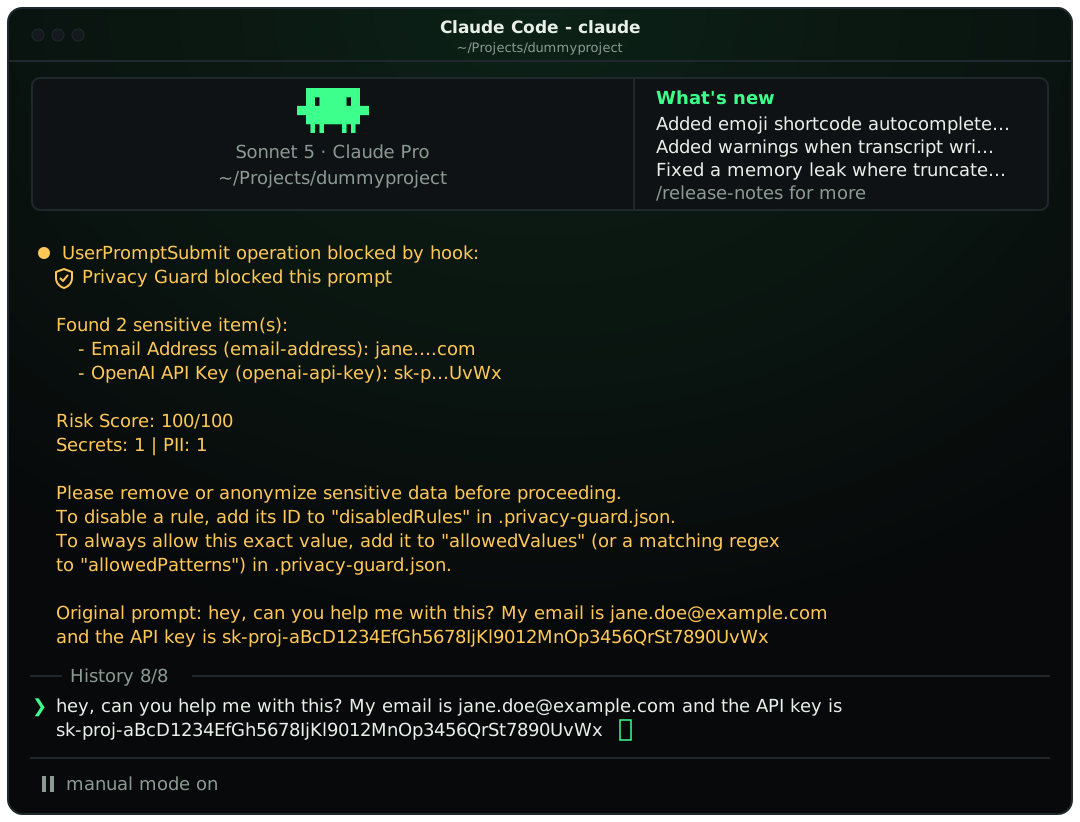
One cat .env puts your credentials in the model's context. Privacy Guard checks every path a secret can take, prompts, tool calls, files and output, and blocks the leak before it reaches the AI.
/plugin marketplace add datumbrain/claude-code-privacy-guardThen run /plugin install claude-code-privacy-guard and restart Claude Code. Full steps
you    read .env

Read(.env)
  Not run - permission denied
  Privacy Guard: .env usually holds credentials.
  Reading it would put them into the conversation.
  Blocked rather than asked because this session
  is in "auto" permission mode, where a
  prompt would not reach you.

  To allow it, add the path to
  toolGuard.allowedPaths in .privacy-guard.json
It keeps working in auto mode, where nobody is approving tool calls. Where a confirmation would never reach you, it denies instead of asking.
UserPromptSubmitScanned before they are sent. In the default mode the prompt is rejected and you see exactly what matched and which rule to disable if it is a false alarm.
PreToolUseThe only point where a leak can still be prevented. Reading or grepping .env, SSH keys or cloud credential files, or a Bash command that prints them or dumps the environment, is stopped or put to you first.
PreToolUseNot just known filenames. Any file whose contents hold a secret is caught, using the same rules as prompts.
PostToolUseIf a secret shows up in tool output anyway, you are told so you can rotate it, and Claude is told not to repeat it.
.env and in-code assignmentstoken: or password, so SHAs and UUIDs stay quietexample.com, git remotes and logo@2x.png are never flaggedEvery opt-in detector is validated, not just pattern-matched, to keep order IDs and test data from tripping the guard.
blockRejects the prompt outright. The sensitive data never reaches the AI.
redactAlso blocks, but hands back a version with placeholders like <EMAIL_1> that you can paste and resubmit.
warnLets the prompt through and shows what was detected. Useful while tuning allowlists.
Drop a .privacy-guard.json in a repo root or your home directory. Or skip the JSON and run the local rules editor, bound to 127.0.0.1 only.
$ npx claude-code-privacy-guard rules
{
  "mode": "block",
  "allowedDomains": ["acme-corp.io"],
  "disabledRules": [],
  "piiProfile": {
    "creditCard": true,
    "ssn": true,
    "phone": false
  },
  "toolGuard": {
    "preToolUse": "ask",
    "postToolUse": "warn",
    "sensitivePaths": ["secrets/**"],
    "allowedPaths": [".env.test"]
  }
}
Hooks are registered when a session starts, so close and reopen Claude Code after installing.
Add the marketplace and install
/plugin marketplace add datumbrain/claude-code-privacy-guard
/plugin install claude-code-privacy-guard
Restart Claude Code. Prompts and tool calls are scanned automatically from then on. To update later:
/plugin marketplace update datumbrain-plugins
No plugin? The rules and allowlist editor also runs straight from npm.
npx claude-code-privacy-guard rules